PF Product floor / GStack product line
4 available modules. One connected foundation.
GStack offers 4 modules for enterprise demos: VisionMetrics, QuoteBuilder, GStack Document Control, QuoteChaser. Each demo is shaped to the manufacturer's workflow and access needs.
Suite map / 00–05
From access to operations, with each boundary visible.
- 00ReceptionGStack Hub
- 01Shop FloorVisionMetrics — Available for enterprise demos
- 02Commercial OfficeQuoteBuilder — Available for enterprise demos
- 03Quality OfficeGStack Document Control — Available for enterprise demos
- 04Follow-up WorkflowQuoteChaser — Available for enterprise demos
- 04Controls RoomMES Connector roadmap
- 05BriefingFocused demo
The map shows portfolio context. It does not imply automatic data movement between every environment.
At a glance
Two detailed product walkthroughs, side by side.
| Attribute | QuoteBuilder | VisionMetrics |
|---|---|---|
| Where it sits | Commercial office | Shop floor and quality office |
| Primary users | Estimators, inside sales, reviewers | Quality engineers, inspectors, plant leads |
| Takes in | Scope, catalog, quantities, pricing inputs | Supported inspection events and images |
| Produces | Reviewable proposals, PDF and Markdown exports | Review decisions, trends, configured alerts, recurring reports |
| Stays authoritative | Your team's commercial judgement | Your existing vision systems and machines |
| Foundation | GStack Hub organization, identity, and product access | |
00 Reception / Secure entry
Shared foundation
GStack Hub
Organization, identity, and product access begin here.
GStack Hub is the shared entry and access foundation for the product line. It is not presented as shop-floor middleware.
- Organization
- The workspace boundary that keeps each customer context distinct.
- Identity
- The people and sign-in context associated with the organization.
- Product access
- The product and role boundary that determines which workflows a user can enter.
- Suite context
- The common foundation used by current and future GStack products.
- 01What enters
- Organization context, users, and product-access decisions.
- 02What happens
- The Hub establishes the shared identity and access context for GStack products.
- 03What the team gets
- A consistent entry foundation across the product line.
BoundaryGStack Hub is an organization and access foundation, not a manufacturing control layer.
01A Commercial Office
Available for enterprise demos
QuoteBuilder
A controlled path from customer scope and catalog inputs to a reviewable proposal.
QuoteBuilder gives the commercial team one workspace for building quotes: customer details, catalog items, quantities, pricing, terms, and revisions stay together, so every proposal is put together the same way and can be checked before it leaves the building.
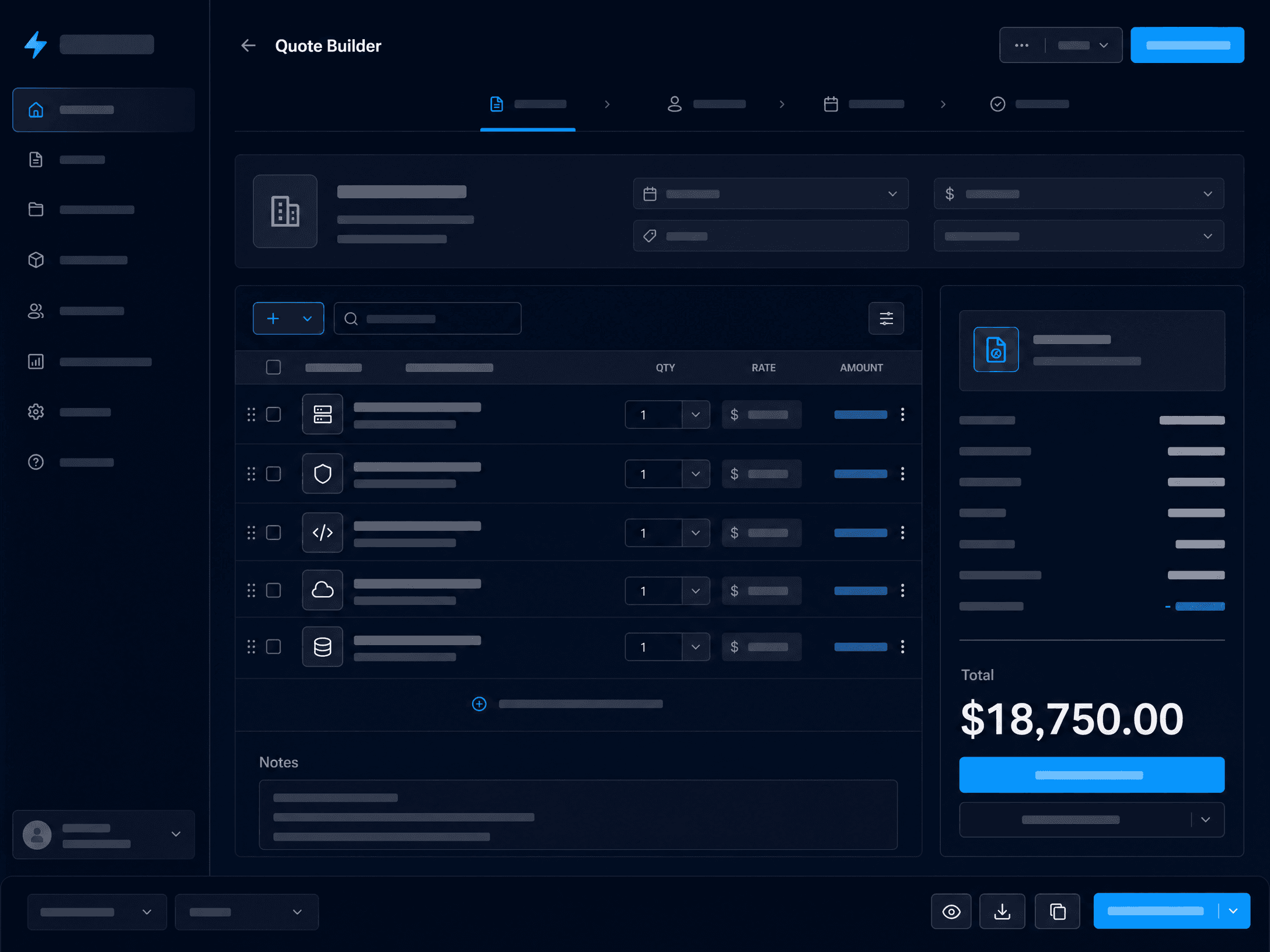
What it does
- Quote details
Company, contact, validity period, tax rate, notes, and terms captured in one structured header.
- Product catalog
Pull standard items from the organization catalog instead of retyping descriptions and pricing.
- Line items and summary
Quantities and unit pricing roll up into a subtotal, tax, and total the reviewer can check line by line.
- Meeting-notes import
Paste notes from a customer conversation to draft line items the team then reviews and edits.
- Saved quote library
Recent quotes and full history, searchable by quote, client, date, and total.
- Export
Produce the finished proposal as a PDF or Markdown document.
See it work
| Catalog item | Qty | Unit (USD) | Line (USD) |
|---|---|---|---|
| Machined housing, 6061-T6 | 240 | 41.20 | 9,888.00 |
| Secondary deburr and wash | 240 | 3.85 | 924.00 |
| Anodize, Type II black | 240 | 6.10 | 1,464.00 |
| First-article inspection | 1 | 480.00 | 480.00 |
- Subtotal
- 12,756.00
- Tax (0%)
- 0.00
- Valid for
- 30 days
Call with Northfield, Tuesday. They need 240 housings in 6061, deburred and washed, black anodize. First-article inspection on the first lot. Standard 30-day validity.
- Machined housing, 6061-T6Qty 240 · from catalog
- Secondary deburr and washQty 240 · from catalog
- Anodize, Type II blackQty 240 · from catalog
- First-article inspectionQty 1 · from catalog
Imported lines arrive as a draft. The estimator reviews and edits every line before the quote is saved.
- Rev AInitial proposalDraft · 3 lines
- Rev BAdded first-article inspectionReviewed · 4 lines
- Rev BReady to sendExported as PDF and Markdown
How it fits the operation
- 01What enters
- Customer details, structured scope, catalog inputs, pricing inputs, quantities, and commercial assumptions.
- 02What happens
- The team builds the proposal, reviews commercial detail, and manages revision within the quoting workflow.
- 03What the team gets
- A reviewable proposal with a clear line back to the scope, catalog, pricing, and revisions used to build it.
BoundaryQuoteBuilder covers proposal creation, review, and revision. Quote follow-up is outside this product.
- Estimators and inside sales
- Commercial and operations leads who review proposals
Uses the shared GStack organization and access model.
01B Commercial Office
Available for enterprise demos
QuoteChaser
A lite CRM for chasing unanswered quotes without turning follow-up into another spreadsheet.
ConnectionUses the shared GStack organization and access model and can be paired with QuoteBuilder.
- 01What enters
- Open quotes, customer contacts, follow-up status, and optional QuoteBuilder context.
- 02What happens
- The team records outreach, schedules the next follow-up, and keeps unanswered quotes visible.
- 03What the team gets
- A focused queue showing which quotes need attention and what follow-up happened last.
BoundaryQuoteChaser does not promise SMS outreach, full CRM replacement, or conversion outcomes.
02A Quality Office
Available for enterprise demos
GStack Document Control
A controlled-document lifecycle for quality and operating teams.
ConnectionUses GStack Hub organization and access controls and shared event infrastructure.
- 01What enters
- Draft content, document context, reviewers, and the intended approval route.
- 02What happens
- The workflow carries a document through drafting, review, approval, release, revision, and retention/archive.
- 03What the team gets
- A controlled document record with its lifecycle state and review history.
BoundaryDocument Control supports workflow integrity; it does not assert regulatory certification or compliance status.
02B Quality Office / Behind the scenes
Shared infrastructure · In development
GStack Compliance Ledger
Shared event and evidence infrastructure for GStack modules.
It supports traceability behind product workflows. It is not a standalone application or compliance certification.
- 01What enters
- Bounded module events and evidence from GStack product workflows.
- 02What happens
- The shared infrastructure records that material behind the product experience.
- 03What the team gets
- A common traceability layer for modules that use it.
BoundaryThe Compliance Ledger is shared in-development infrastructure, not a customer-facing certification product.
03A Shop Floor / Quality Station
Available for enterprise demos
VisionMetrics
A shared operating view for manufacturing inspection and quality review.
VisionMetrics collects the inspection events and images your existing vision systems already produce and puts them in front of the quality team: a review workspace, trends across lines, configured alerts, and recurring reports, without changing how the inspection itself is done.
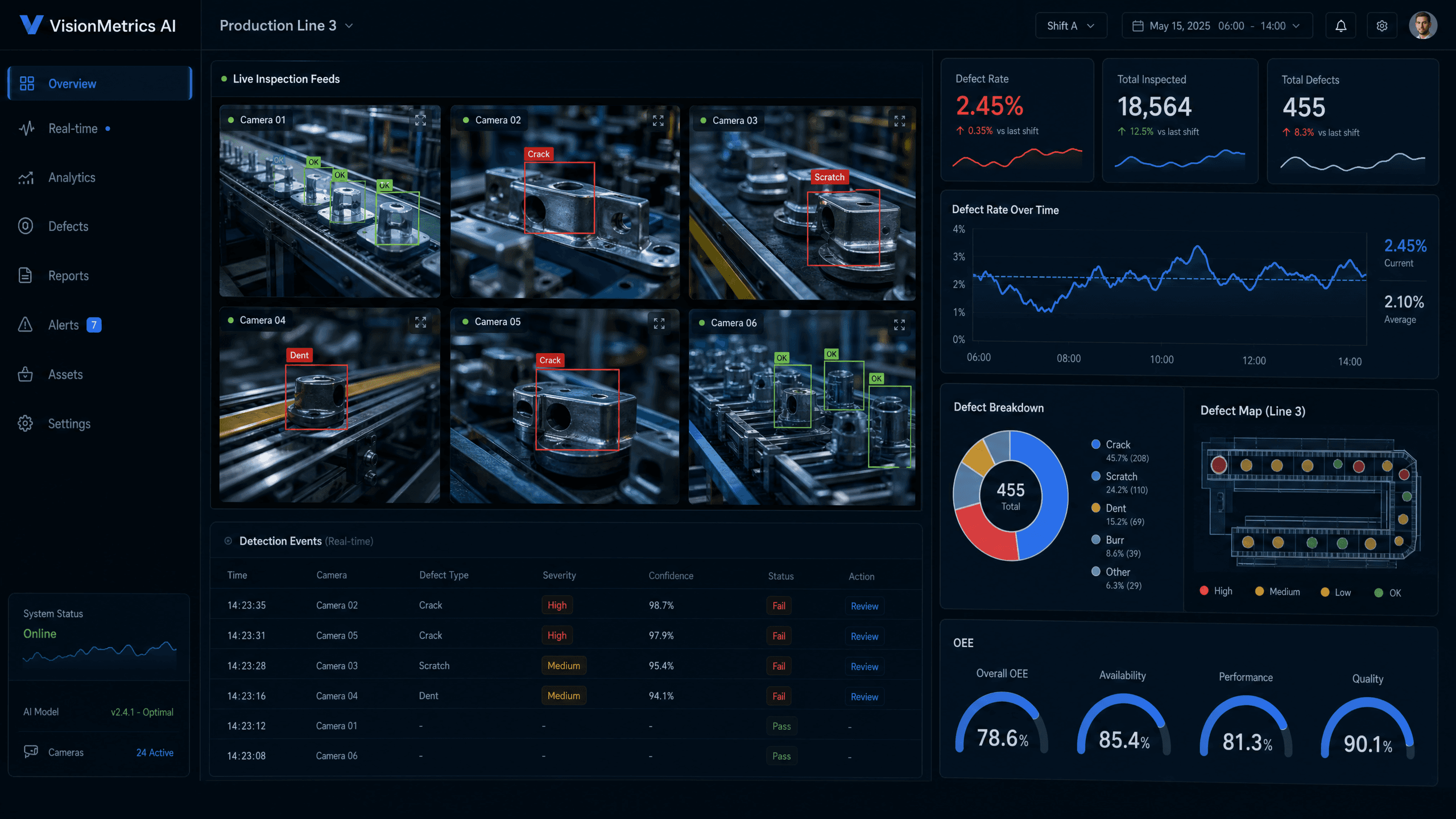
What it does
- Event and image intake
Supported inspection records and images arrive from the line through an integration endpoint or the sync agent.
- VisionMetrics Sync agent
Runs on the inspection PC, queues images locally if the connection drops, and reports a heartbeat so you can see each machine is connected.
- Review workspace
Records and their images side by side, so a person can confirm or clear what the line reported.
- Trends across lines
Record counts and categories over time, per line and across provisioned multi-line visibility.
- Configured alerts
Per-line thresholds you set, with an alert history showing when a line crossed them.
- Recurring reports
Scheduled quality reports the team can open and download.
See it work
- Surface markL3 · CAM 02 · 09:24Confirmed by reviewer
- Dimensional checkL3 · CAM 01 · 09:21Cleared by reviewer
- Label placementL1 · CAM 04 · 09:17Awaiting review
- Surface markL2 · CAM 01 · 09:12Awaiting review
- Weekly quality summaryMondays 07:00 · All linesDownload
- Line 3 review logDaily 18:00 · Line 3Download
- Monthly line comparison1st of month · All linesDownload
- INSP-PC-L3-ALine 3 · CAM 01, CAM 02Heartbeat 12 s ago
- INSP-PC-L1-ALine 1 · CAM 04Heartbeat 20 s ago
- INSP-PC-L2-ALine 2 · CAM 01Offline · 14 images queued locally
One key per inspection PC. Queued images upload when the connection returns.
How it fits the operation
- 01What enters
- Supported inspection events and images, configured alerts, production-line context, and reporting inputs.
- 02What happens
- Teams review records and images, inspect trends, and work across provisioned multi-line visibility.
- 03What the team gets
- A human review lane with configured alerts and recurring reports grounded in the supplied inspection records.
BoundaryExisting vision systems and machines remain authoritative. VisionMetrics receives their supported events and images for review.
- Quality engineers and inspectors
- Production and plant leadership who need the line-level view
Uses the shared GStack organization and access model.
04A Controls Room
Roadmap
MES Connector
Roadmap work for selected data import and outbound routing patterns.
ConnectionIntended to connect selected source environments to GStack workflows where scope is agreed.
- 01What enters
- Potentially, selected records or events from agreed SCADA, MES, line, or machine environments.
- 02What happens
- Supported systems, exchange patterns, and implementation scope still need to be defined.
- 03What the team gets
- No committed connector package; roadmap discussions begin with the actual source and destination systems.
BoundaryNo SCADA control or deployed connector is implied. Systems and scope remain uncommitted.
05 Briefing / Focused demo
Bring one real operating handoff.
We will scope the operating question, source records, users, sites, production lines, integration boundaries, and the product status that applies.
- 01Scope
Walk through the workflow, the people involved, and the records it depends on.
- 02Demonstrate
See the product in a tenant-isolated synthetic demonstration shaped to that workflow.
- 03Decide
Leave with what fits today, what needs integration, and what is still future work.